.png)


Integration
Connect Neufast With Your Existing HR Ecosystem
Integrate Neufast seamlessly with your HRIS, ERP, ATS, and talent systems through our robust APIs and RESTful architecture, with proven integrations across platforms such as SAP and Oracle.
.png)
NEUFAST · PUBLIC OVERVIEW · MODEL CONTEXT PROTOCOL
Neufast, Opened to Agents.

Neufast's hiring platform — job setup, AI-led candidate interviews, and CV screening — is reachable by AI agents through a standard, self-describing interface. Any agent that speaks MCP can set up a job, screen a stack of CVs, or check on a candidate, using nothing but the recruiter's own credentials.
2
Domains
32
Tools
3
Capability Areas
2
Guided Prompts
01 · ORIENTATION
A Hiring Platform, Not a Chatbot
Neufast is where recruiters configure a role, run AI-led candidate interviews, and screen incoming CVs. Historically, using any of that from outside Neufast's own product meant hand-integrating a REST API: reading documentation, matching request shapes, and re-implementing error handling per endpoint.
Model Context Protocol (MCP) is an open standard that changes that arrangement. A server describes what it can do — its tools — how to use the trickier parts well — its prompts — and how to get oriented on first connect — its instructions. A client, which in practice is an AI agent, reads that description live instead of having it hard-coded in ahead of time.
The Neufast MCP server is Neufast's implementation of that idea: one connection that exposes hiring workflows as callable, typed operations, instead of a REST surface a developer has to read and translate by hand.

02 · ARCHITECTURE
One Connection, Two Hops to the Platform
An agent talks to the MCP server; the MCP server talks to Neufast's own External API on the agent's behalf. The server holds no credentials of its own — every call is made using the token the connecting recruiter supplied, and nothing about that token is kept once the call finishes.
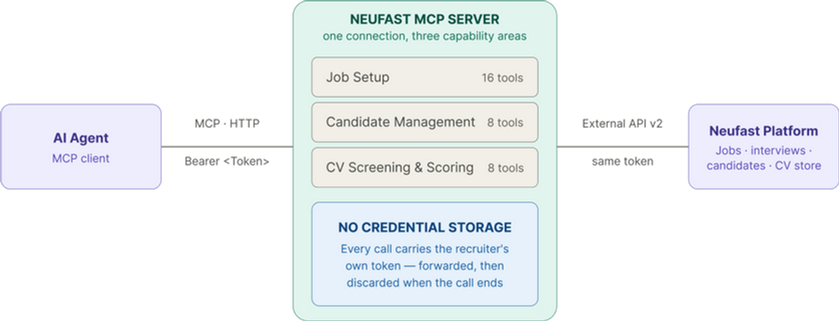
The server sits between an agent and Neufast's own API, translating typed tool calls into platform requests — never issuing, storing, or reusing a credential of its own.
job_id
Returned once a job is created; every later job-setup and candidate call needs it.
interview_id
Identifies one candidate's specific interview once they're registered to a job.
Response envelope
Every tool returns the same success/error shape, regardless of which one was called.
03 · CAPABILITIES
Three things an agent can actually do
Every tool below is a real, individually callable operation — not a bundle. An agent calls exactly the
ones a task needs, in whatever order that task requires.
Job Setup
16 tools
Create a job, then configure every part of it independently: candidate-facing session layout, CV screening criteria, interview questions, scoring weights, and the invitation email — including AI-drafted starting points for criteria and questions.
get_profile
list_groups
list_jobs
preview_job
create_job
get_job
get_job_status
update_job_layout
parse_cv_criteria
update_cv_criteria
generate_questions
update_job_questions
get_job_scoring
update_job_scoring
list_email_domains
preview_job
preview_job
update_job_email
Candidate Management
8 tools
register_candidate
invite_candidate
change_candidate_deadline
fetch_candidate_invitation
fetch_candidate_login_url
Register one candidate at a time, invite or resend their invitation, and look up their status, score, sign-in link, or interview video. The one deliberate batch operation is adjusting deadlines for many candidates in a single call.
fetch_candidate_status
fetch_candidate_score
fetch_candidate_videos_url
CV Screening & Scoring
8 tools
upload_cvs_for_scoring
check_cv_scan_status
import_cvs_for_scoring
poll_cv_scoring_progress
fetch_parsed_cv
fetch_cv_score
Upload a batch of CVs, wait for them to clear security scanning, and have them parsed and scored against a job's criteria. Compare several scored candidates at once, or re-score after criteria change.
compare_cv_scores
rescore_cvs_after_criteria_change
03 · CAPABILITIES
Three things an agent can actually do
Every tool below is a real, individually callable operation — not a bundle. An agent calls exactly the
ones a task needs, in whatever order that task requires.

Connect
The agent opens a session and attaches the recruiter's own bearer token — nothing is issued or stored by the server itself.
.png)
Discover
It reads back every available tool and prompt, plus the server's own instructions on a sensible order of operations.
.png)
Call A Tool
It calls one tool with arguments checked against a published schema before anything reaches the Neufast platform.
.png)
Get a Result
It gets back a consistently shaped result — the same success/error envelope no matter which tool was called.
The four-step handshake every connecting agent goes through, in order.
Prompts exist for the parts of this that are easy to get subtly wrong from a tool signature alone — for example, rewriting a candidate's invitation email without breaking the merge fields the platform fills in when it's actually sent, or knowing exactly which candidate-management requests are and aren't supported yet, before trying to approximate one with the wrong tool.

What you could build
Set up a role end-to-end from a job description — criteria, questions, scoring, and the invitation email included.
Screen and rank a batch of CVs against a job's criteria, and surface the strongest candidates first.
Check on a candidate — interview status, score, or video — without a recruiter switching tabs.
Adjust invitation tone or deadlines for one candidate or many, safely and in one call.
05 · TRUST MODEL
Nothing stored, nothing assumed
Every call runs under the connecting recruiter's own permissions — never a shared or elevated service credential. If a token is missing or invalid, the server treats that plainly as an authentication problem, not something to retry around.
The same honesty applies to scope. Rather than approximate a request that isn't supported yet with the nearest available tool, the server states the boundary directly, so an agent can say so too instead of guessing.
None of this is hidden from a connecting agent. The same list above is what the server tells an agent that asks for one of these, in the moment it asks — not a limitation discovered later by a failed call.
Bulk-adding candidates from a spreadsheet or typed rows (CV-file upload is covered)
ROADMAP
Listing or searching candidates for a job
ROADMAP
Changing a candidate's shortlist / reject / waitlist status or profile fields
ROADMAP
Deleting a candidate, or resetting them to retake their interview
ROADMAP
SMS invitations, or inviting more than one candidate per call
ROADMAP
Scheduling a future interview start time at registration
ROADMAP
NEUFAST MCP SERVER — PUBLIC OVERVIEW
Last reviewed September 2026. Provisioning is scoped per recruiter — talk to your Neufast contact to get a token and connect an agent.

We have a suit of APIs for external integration. We have integrated with major ERP and HRIS system including SAP and Oracle.
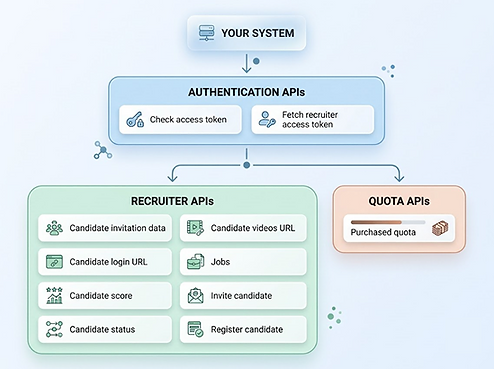
We can also integrate with many systems easily using RESTful APIs.
Not Promises--Proof
Loved by HR Leaders Across the World

Carlsberg Asia Group
6-Month Pilot Success: Carlsberg Asia Group Signs 2-Year Partnership with Neufast
The internal user survey result of the 6-month pilot is overall positive especially for the Neufast AI pdf assessment report. We are very happy and satisfied with the performance of this online video interview platform. We signed a two-year contract. Really appreciate your support and assistance in our partnership.


Frequently Asked Questions
Everything You Need to Know About Neufast
